Shipping cross-platform without losing your mind
Lessons from maintaining iOS, Android, and web on one small team — analytics, RCAs, and keeping ANRs down.
Shipping the same product on iOS, Android, and the web sounds like three times the work. On a small team it doesn’t have to be, as long as you’re careful about the order you do things in. This is what has worked for me, and the habits that keep it from falling apart after launch.
1. Build one client first, and build it well
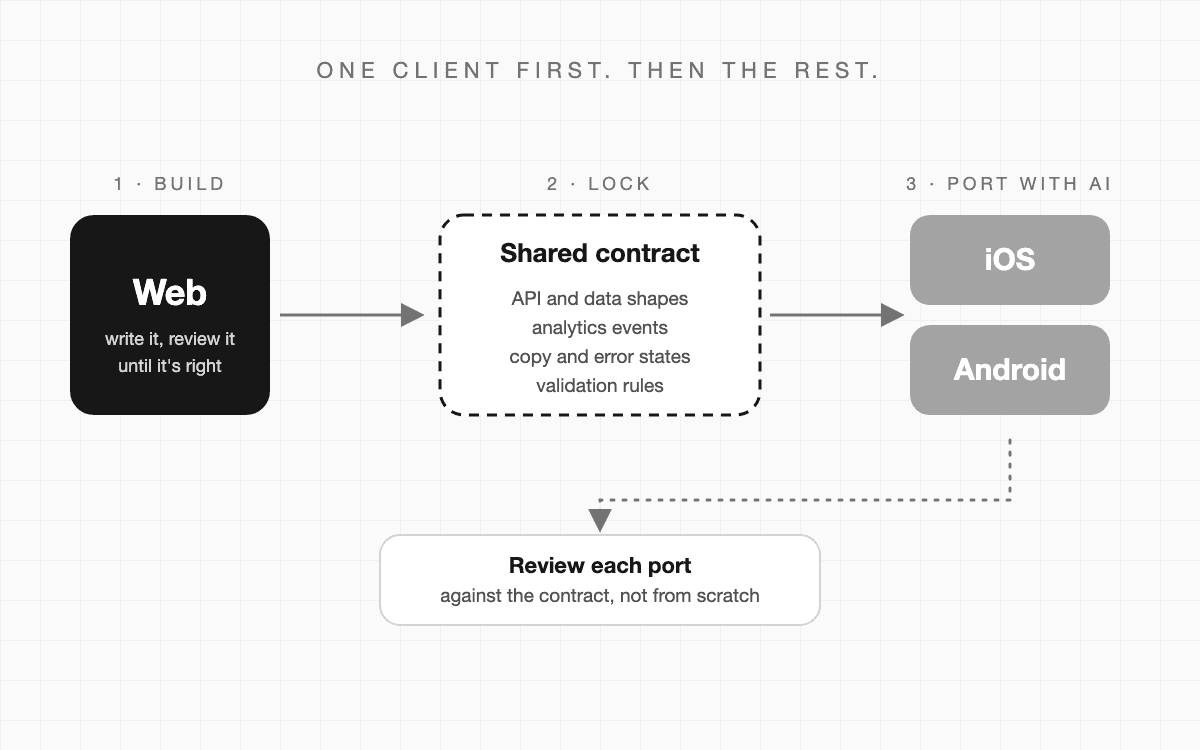
I start with a single client, and it’s usually the web. Models are very good at web code, and you can see and review the result in seconds. I write it, review it properly, and don’t move on until I’m happy with it.
This is the step where all the real decisions get made: what the screens do, how errors look, what happens when something is empty. It’s much cheaper to settle those once, in one place, than three times in three codebases.
2. Write down what has to stay the same
Once the first client is solid, I pull out the things that must be identical everywhere. That’s the shared contract: the API and data shapes, analytics event names and their parameters, copy, error states, and validation rules.
AI is a big help here too. Ask it to read the finished client and draft the contract, then read that draft carefully and fix it. Keep it in the repo, next to the code, so it gets updated when things change.
3. Port with AI, and review against the contract
With the web client and the contract in hand, I ask AI to port it to the other clients. The hard design decisions are already made, so the model is mostly translating, and that’s a job it does well.
I treat each port as a first draft. I review it against the contract, and I look hardest at the places where platforms really do differ: navigation, permissions, app lifecycle, and how the system handles the keyboard and the back button.
4. Test like you’re trying to break it
Most bugs I’ve seen after launch weren’t exotic. They came from a phone with a different screen, a phone in low power mode, or a user on dark mode when the developer only ever tested light. So I check a few things on every release:
- Smallest and biggest phone
- A tablet
- A narrow browser window
- Larger text sizes
- Low power mode and battery saver
- Slow network and offline
- Permissions denied
- App sent to background and back
- Light mode
- Dark mode
- Switching while the app is open
- Contrast and readability
For the rest, I use AI as a second pair of eyes. I give it the feature and ask what could break, what I haven’t tested, and which edge cases a user might hit. It always comes back with a few I hadn’t thought of, and some are worth writing a test for.
5. Ship in a way you can undo
Mobile makes mistakes expensive, because you can’t update everyone at once, and old versions stay in the wild for a long time. A few things help:
- Roll out in stages where you can, and keep a switch to turn a feature off without a new release.
- Keep the backend friendly to old app versions. Add things, and be slow to remove them.
- Set up crash and ANR reporting before launch, not after the first complaint.
- Allow for store review time when you plan a date, since it differs between iOS and Android.
6. Analytics, follow-ups, and who owns what
Launching is not the finish line. On a small team, problems arrive from every direction: user reports, crash reports, ANRs, a strange number in a dashboard. If nobody owns them, they sit.
So I set up analytics before launch, with PostHog, GA4, or whatever the team uses. The event names come from the contract, so they match across all three clients. Then I put a rhythm in place for checking afterwards:
A few days after launch I look at the analytics and watch session recordings in Clarity. Seeing someone actually use the thing finds problems that numbers don’t show. About a week in I compare real use with what I expected. And a few months later I look again, to check that everything is still as it should be.
Meanwhile, every issue that comes in needs to be triaged: is it real, how bad is it, and who owns it? Each one gets one named owner, a short root cause (RCA), and a follow-up, so the same thing doesn’t come back.
Report: a user says the screen freezes after the app is reopened.
Owner: one named person, not “the team”.
Cause: a request started before the app went to the background never finished.
Fix: cancel and retry on resume.
Follow-up: add a test for it, and check the ANR graph in a week.
The short version
Build one client really well, write down what has to match, and port with AI while you review against that list. Test on the awkward screens and settings, ship in a way you can undo, and keep looking after launch: a few days, a week, a few months. None of it is complicated. It just has to be a habit.
Building something across iOS, Android, and web? Come and say hi.